- Ana
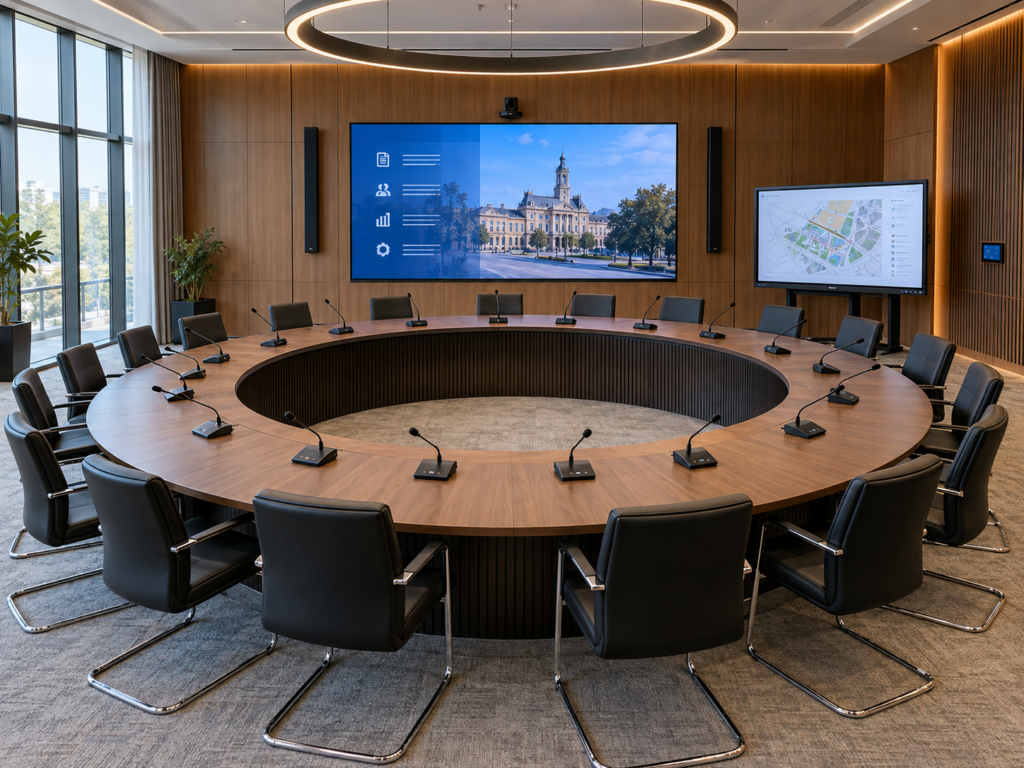
A council session can go wrong in small, very public ways: a councillor’s microphone cuts out mid-debate, a vote has to be repeated because the tally is disputed, or the live stream drops just as a contested decision is taken. Each one costs time, credibility and, sometimes, legal certainty. This guide sets out how to plan a council chamber conference system that works on day one and keeps working for the next ten years.
Key takeaways
- Start from the chamber’s procedure – speaking rules, voting types, minutes, publicity – not from a product catalogue.
- Treat conference audio, voting, interpretation, recording and streaming as one integrated system with one control interface.
- Choose between wired, wireless and hybrid infrastructure on reliability, room constraints and lifecycle cost, not on purchase price alone.
- Electronic voting needs identification, an audit trail and a documented fallback procedure before it is used in a live session.
- Plan training, commissioning and a support SLA as part of the project; they decide whether the system is trusted by councillors.
What a council chamber conference system includes
A modern chamber system is more than microphones on desks. It is a set of subsystems that share one network, one control logic and one record of the session.
- Discussion system: delegate and chair units with microphone, loudspeaker, request-to-speak and chair priority, used by councillors, the chair and the secretary.
- Electronic voting: identification (card, NFC or PIN), vote capture, real-time results and reports for the secretariat and legal department.
- Sound reinforcement: loudspeakers for the public gallery and press area, with echo and feedback control.
- Recording and minutes: multitrack audio and video, tagged with speaker, agenda item and time.
- Cameras and streaming: automatic camera tracking of the active speaker and a live stream to the website or other platforms.
- Simultaneous interpretation: interpreter booths, consoles and language distribution to the floor and to the stream.
- Displays: agenda, speaker list, voting results and presentations on screens in the chamber.
- Control and management: software for agenda, speaking time and session management, plus remote monitoring by the support team.
Not every chamber needs every subsystem. A local council of 15 members has different needs from a county council or a national parliament. The scope should follow the procedure, not the other way round.
Seven steps to plan the system
- Map the procedure. Document how sessions run: who can speak and for how long, how the chair intervenes, which vote types are used (open, secret, roll-call), how quorum is checked and how minutes are produced. Check the legal requirements for publicity, recording and voting with your legal department
- Define users and use cases. List the seats (councillors, chair, secretary, executive, guests), public and press capacity, and any other uses of the room – committee meetings, hearings, events.
- Survey the room. Assess acoustics, furniture (fixed or movable desks), cable paths, power, network and heritage constraints. Many council buildings are listed or historic, which limits drilling and cabling.
- Choose the infrastructure. Decide between wired, wireless or hybrid discussion systems (see the comparison below), and how audio is distributed over the network.
- Design the integration. Connect discussion, voting, cameras, recording, streaming and displays so that one action – a councillor pressing the request button – moves the camera, updates the speaker list and tags the recording.
- Plan security and continuity. Separate the AV network, control administrator access, keep a backup power path (UPS) for the core, and define what happens if a component fails mid-session.
- Commission, train and support. Test with a simulated session, train the chair, secretary and operators separately, and agree a support SLA that covers session days.
Wired, wireless or hybrid?
The choice of discussion infrastructure drives cost, installation time and long-term reliability. There is no single right answer; the room and the way it is used decide.
- Wired systems: Wired systems offer the highest reliability, with no radio interference and no batteries to manage. They need cabling through the floor or furniture and suit purpose-built chambers with fixed seating. Operating effort is low, and interception requires physical access to the network.
- Wireless systems: Wireless systems install quickly with minimal cabling, and desks can be moved or rearranged. This makes them well suited to multi-purpose rooms and historic buildings. Reliability depends on good radio frequency planning, strong encryption and a battery charging routine.
- Hybrid systems: Hybrid systems combine a wired core for permanent seats with wireless units for guests or variable seating. They balance reliability and flexibility, and encryption is needed only on the wireless part. They suit chambers with a fixed floor plan that also host hearings, committees or events.
Electronic voting: what to get right
Electronic voting saves time and removes counting disputes, but only if the process around it is as robust as the technology.
- Identification: each vote must belong to an identified councillor, typically through a personal card, NFC badge or PIN at the delegate unit.
- Vote types: the system should support every vote type in your procedure, including secret ballots where results are shown without individual names.
- Transparency: results displayed in the chamber and on the stream immediately, with nominal results exported for the minutes where the law requires them.
- Audit trail: time-stamped logs, protected from editing, kept for the retention period your institution sets.
- Fallback: a written procedure for a technical failure – for example, a switch to a show of hands – approved before the first live session.
How ELTEK Integrate helps
ELTEK Integrate designs, integrates and supports conference systems for public institutions as a single point of responsibility. One team covers the full scope: discussion and voting systems, simultaneous interpretation, sound, video, recording and streaming, IT and communication, and long-term maintenance.
For a council chamber, we typically support you through:
- Consulting: procedure mapping, needs assessment and room survey.
- Design: system architecture, wired, wireless or hybrid infrastructure, and integration with cameras, streaming and displays.
- Integration and commissioning: installation, configuration and testing with a simulated session.
- Training: separate sessions for the chair, the secretariat and technical operators.
- Support: maintenance and an SLA aligned with your session calendar.
Frequently Asked Questions
What is a council chamber conference system?
It is an integrated system of delegate microphones, chair controls, voting, sound reinforcement, recording, cameras and streaming. It manages who speaks, records what is said and decided, and makes the session public.
Is a wireless conference system reliable enough for council sessions?
Yes, when it uses encrypted transmission, a proper radio frequency plan and a battery management routine. For purpose-built chambers with fixed seating, a wired or hybrid system remains the lowest-maintenance option.
How does electronic voting work in a council chamber?
Each councillor identifies at the delegate unit with a card, badge or PIN, votes using dedicated buttons, and the results appear in real time. The system logs each vote with a timestamp and exports reports for the minutes.
Can the conference system stream sessions live?
Yes. Camera tracking follows the active speaker automatically, and the audio, video and voting results can be streamed to the institution’s website or other platforms and archived by agenda item.
How long does a council chamber project take?
It depends on scope and building constraints. A replacement of the discussion system in an existing room is much faster than a full fit-out with voting, interpretation and streaming.
Need Additional Information?
If you require additional technical details or project‑specific information, our team is available to provide clarification and guidance.